PHOTOGRAPHING FIREWORKS
How to capture the colours of the sky and bursts that look woven from fibre-optic threads, crystal clear – on New Year's Eve and at town festivals.
A 30-SECOND EXPOSURE
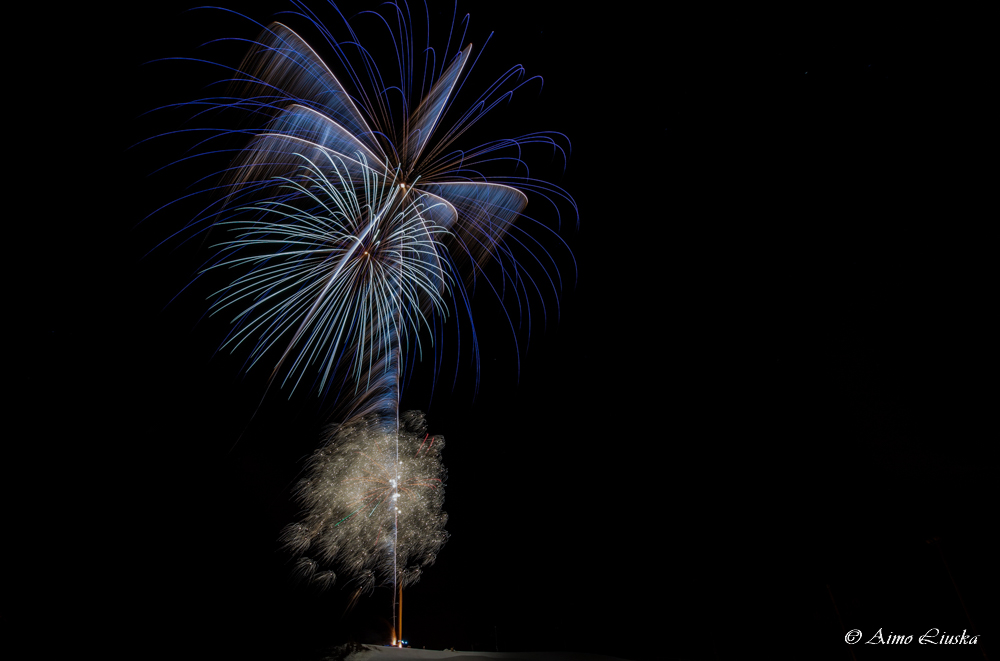
Why a long exposure? A firework is a moving point of light. When the shutter is open for a few seconds, the point draws a trail of light in the photo. With a longer exposure several bursts fit into the same frame.
GEAR AND LOCATION
- A sturdy tripod: with a long exposure even a small movement smears the trails.
- Remote release or timer: prevents shake. In Bulb mode a remote release is almost essential.
- A wide angle (16–24 mm): fits in plenty of sky, so you don't have to guess where the bursts will be. Closer up, 35–70 mm also works.
- Stand upwind: the smoke drifts with the wind. If the smoke ends up between you and the fireworks, the photos turn blurry and grey.
- Foreground and scenery: a church, a bridge, water or a city skyline makes the photo more than just "lights on a black sky". Water reflects the fireworks a second time.
SETTING UP THE CAMERA
- Manual mode (M): the automatic modes try to brighten the black sky and blow out the fireworks.
- ISO 100–200: fireworks are bright, and a low ISO keeps the sky clean of noise.
- Aperture f/8–f/11: the trails stay thin and colourful. With a wide aperture they spread into white blobs.
- Exposure 2–8 s for a single burst, or Bulb: open the shutter as the rocket goes up and close it when the burst fades.
- Image stabilisation off on a tripod and RAW on, so you can adjust white balance and brightness afterwards.
HOW TO NAIL FOCUS IN THE DARK
Switch to manual focus (MF)
Autofocus finds nothing to focus on in a black sky and may stop the camera from firing at all.
Focus on a distant light
Zoom in on the screen to a distant street light or building and turn the focus until it is sharp. The infinity mark on the lens is not always accurate.
Check the first shot
Zoom in on the first firework photo. Once the focus is right, put a piece of tape on the focus ring so that it doesn't move by accident in the dark.
SETTINGS FOR DIFFERENT SITUATIONS
| Situation | Aperture | ISO | Exposure |
|---|---|---|---|
| A single rocket | f/8–f/11 | 100 | 2–4 s or Bulb |
| Several bursts in one photo | f/11 | 100 | 10–30 s (black card) |
| With a cityscape | f/8 | 100–200 | 5–15 s |
| Handheld, no tripod | widest (f/2.8) | 800–1600 | 1/30–1/60 s |
Handheld, the burst shows as dots rather than trails – the photo can still be a lovely souvenir of the celebration.
THE BLACK CARD
- The idea: keep the shutter open for a long time in Bulb mode and cover the lens with black cardboard between the bursts.
- The benefit: you get the 3–5 best bursts in one photo, but the sky and city lights don't overexpose.
- In practice: hold the card in front of the lens without touching it, lift it away when a rocket goes up and put it back when the burst fades.
- Alternative: take many short shots and combine the best ones as layers when editing (Lighten blend mode).
SHOOTING WITH A PHONE
- Night mode doesn't work: it combines many frames and smears moving lights. Try a normal photo or pro mode.
- Pro mode: ISO 100–200, shutter speed 1–2 s and focus at infinity, with the phone on a tripod or resting against something.
- Burst and video: hold the shutter button down or shoot 4K video and pick the best frames from it.
- Lock the exposure: tap the sky and drag the brightness down so the bursts don't burn out to white.
SAFETY AND NEW YEAR'S EVE
Read more: Manual mode, Focus modes and Night and northern lights photography.