GUIDE
ISO & NOISE CONTROL
Sensor sensitivity, preventing digital noise and clean photos in low light.
THE EFFECT OF ISO
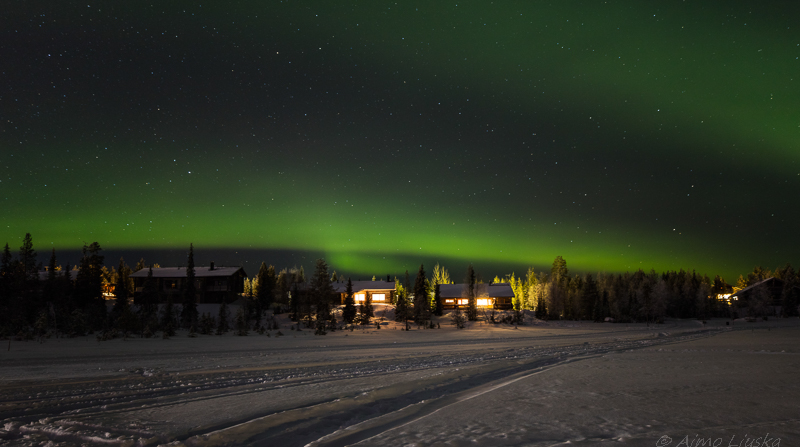
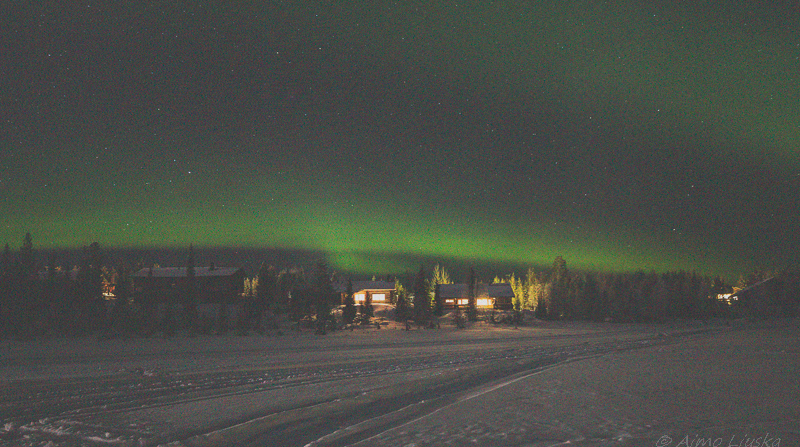
HOW ISO AFFECTS IMAGE QUALITY
✨ Low ISO (e.g. ISO 100)
A perfectly clean image with the best dynamic range and detail
A perfectly clean image with the best dynamic range and detail
🌙 High ISO (e.g. ISO 6400)
Makes low-light shooting possible, but adds noise and grain
Makes low-light shooting possible, but adds noise and grain
How does ISO work?
ISO doesn’t actually add light to the camera’s sensor – it amplifies the electrical signal the sensor has collected. The more the signal is amplified, the more digital “noise” comes with it, i.e. random variations in colour and brightness.
SITUATIONS
ISO VALUES FOR DIFFERENT SITUATIONS
- ISO 100 – 200: Bright sunlight, landscapes and shooting from a tripod. Image quality is at its best.
- ISO 400 – 800: Cloudy weather, shady places and indoors in natural light.
- ISO 1600 – 3200: Events and sports in dim light without a flash.
- ISO 6400+: Very dark conditions, night shots without a tripod, or stars.
EXPOSURE & EDITING
CONTROLLING AND REMOVING NOISE
- Correct exposure (“expose to the right”): Expose a little on the bright side rather than underexposing – brightening an underexposed photo afterwards adds a lot of noise. But be careful not to blow out the brightest areas: watch the histogram and the highlight warning.
- Luminance noise reduction: Smooths out grain in software (Lightroom/Photoshop), but can soften fine detail.
- AI-based noise reduction: Modern AI tools (such as Lightroom Denoise or Topaz Photo AI) remove noise while keeping sharp detail.
SUMMARY
Next guideManual mode
A PRO CHECKLIST FOR MANAGING ISO
1. Keep the ISO as low as possible
Open the aperture or use a slower shutter speed before raising the ISO, if your subject is staying still.
2. Don’t fear noise more than blur
A sharp photo with some noise is always better than a shaky, blurry photo at a low ISO.
3. Make use of Auto ISO
Turn on Auto ISO in the camera and set a maximum (e.g. ISO 6400) and a minimum shutter speed for it.